Your Mosaic Environment, Now in Your AI Agent

Starting today, AI agents such as Claude, ChatGPT, Claude Code, Codex and Visual Studio Code can work with your Mosaic environment. Ask in plain language, and the agent finds, changes, localizes and publishes your content across the managed services and your own custom services, signed in as you and limited to the permissions you choose.
Beyond the Screens You Have
The Management System gives editors a screen for every common task. But some tasks span several services, touch hundreds of items, or simply have no screen yet. Until now, they meant many clicks or a developer writing a script.
Now you can ask:
The agent queries the Media Service, creates the collection, uploads its cover to the Image Service, saves the translations in the Localization Service and publishes everything, asking for your confirmation before it changes anything.
Signed In as You, Never More
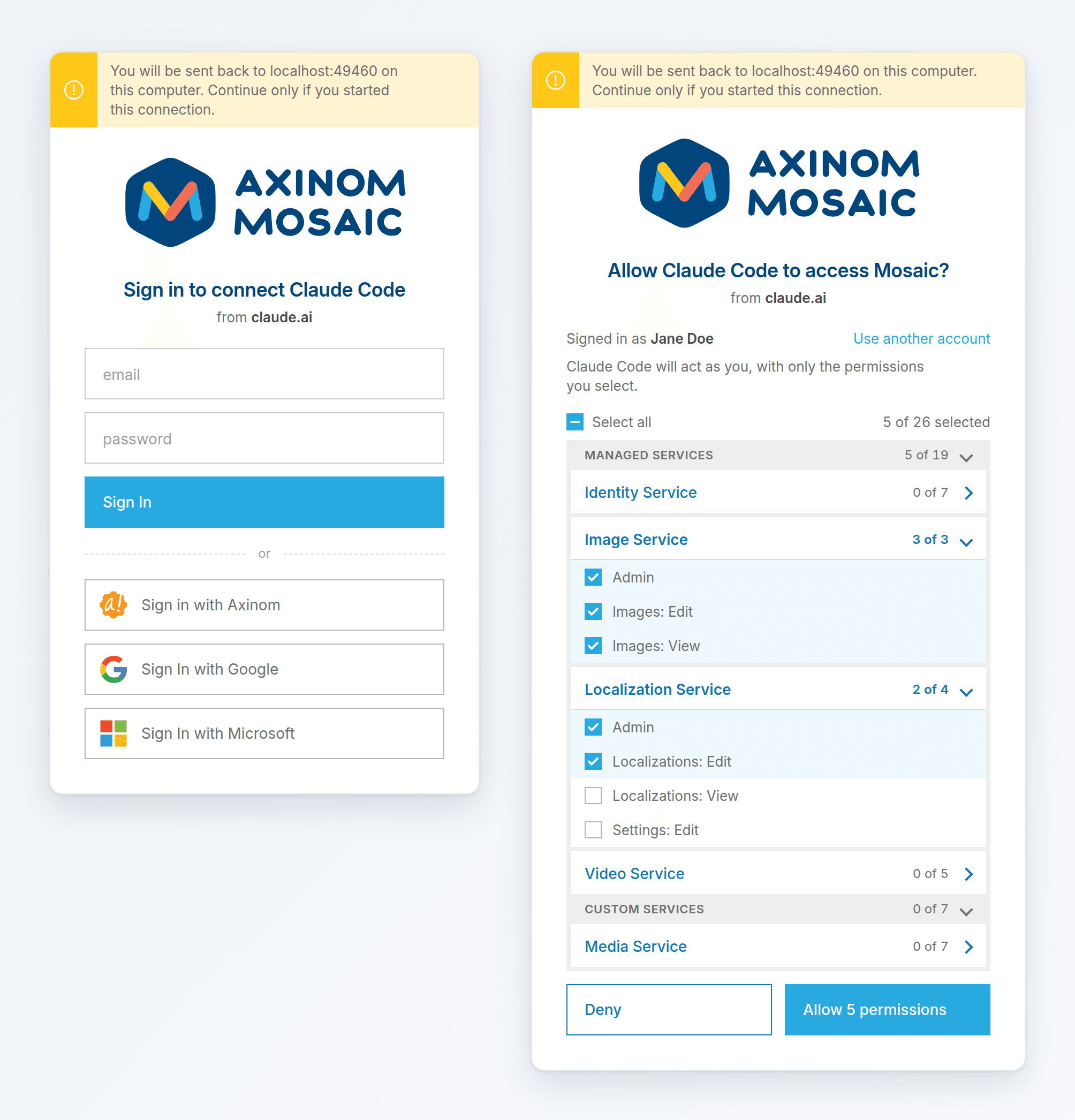
Agents connect through the new Mosaic MCP Server, which speaks the Model Context Protocol (MCP) that AI agents use to reach tools and data. They sign in with the identity providers of your environment, through the Identity Service, which is now an OAuth 2.1 authorization server:
- You choose the permissions. When you connect an agent, you see which application asks for access and select which of your permissions it gets.
- Every change is traceable.
Changes show you and the agent, for example
Jane Doe (via Claude). - You stay in control. Administrators decide which agents can connect, and disabling an agent stops all its connections within minutes.
Your Services, Too
The agent can call every managed service with a management GraphQL API, and your own custom services. Services built on the Mosaic Media Template work right away; other custom services announce their GraphQL endpoint in the configuration of their microfrontend. Agents explore the schemas themselves, so they work with your data model without any setup.
Not Only for AI Agents
The same OAuth 2.1 authorization server works for any application that speaks OAuth 2.0 or 2.1: command-line tools, native apps and integration platforms. Service accounts can now get their access tokens with the standard client credentials grant, so tools such as Postman or n8n work without Mosaic-specific code.
Get Started
- Add the agent as an OAuth client of your environment in the Management System, under Settings > Access Management > OAuth Clients.
- Add the MCP server URL of your environment to the agent:
https://mcp.service.eu.axinom.net/<tenant-id>/<environment-id>. - Sign in, choose the permissions, and start asking.
Follow the hands-on guide Work with AI Agents to connect Claude and curate your first collection, and read more about the Mosaic MCP Server and the OAuth 2.1 Authorization Server.