OAuth 2.1 Authorization Server
The Identity Service is an OAuth 2.1 authorization server for each environment. Any application that speaks OAuth 2.0 or OAuth 2.1 can sign a user in with the identity providers of an environment and get an access token for that environment. The token contains only the permissions that the user grants to the application, and only as long as the user still has them.
Typical applications are:
- AI agents such as Claude, Claude Code, ChatGPT, Codex, Visual Studio Code or Cursor, which work with Mosaic through the Mosaic MCP Server.
- Command-line tools and native apps that act for a user.
- Integration tools such as Postman or n8n, which get access tokens for service accounts with the standard client credentials grant.
Each application acts in the name of the signed-in user, with that user's permissions, instead of a shared secret with fixed permissions.
Every change it makes shows the user and the application, for example Jane Doe (via Claude Code).
Endpoints
Each environment is its own issuer, with its own OAuth clients, identity providers and signing keys. The issuer of an environment is:
https://id.service.eu.axinom.net/<tenant-id>/<environment-id>
| Endpoint | Purpose |
|---|---|
GET /.well-known/oauth-authorization-server/<tenant-id>/<environment-id> | Authorization server metadata of the environment (RFC 8414) |
GET /<tenant-id>/<environment-id>/oauth/authorize | Starts a sign-in with the authorization code flow and PKCE |
POST /<tenant-id>/<environment-id>/oauth/token | Issues and refreshes access tokens, and issues tokens for service accounts |
GET /<tenant-id>/<environment-id>/.well-known/jwks.json | Public keys to validate the access tokens of the environment |
All paths are relative to https://id.service.eu.axinom.net.
Most OAuth libraries and tools only need the issuer or the metadata URL; they discover the other endpoints from the metadata.
The metadata lists:
- the grant types
authorization_code,refresh_tokenandclient_credentials S256as the only PKCE method- the client authentication methods
none,client_secret_basicandclient_secret_post - support for Client ID Metadata Documents
- the
issparameter in authorization responses (RFC 9207)
OAuth Clients
No application can connect to an environment until it is added as an OAuth client of that environment. Users with the right permissions manage the OAuth clients in the Management System; see Manage OAuth Clients.
Each OAuth client has one of two registration types:
| Registration type | Client ID | Redirect URIs | Typical applications |
|---|---|---|---|
| CIMD (Client ID Metadata Document) | The HTTPS URL of the metadata document that the application publishes, e.g. https://claude.ai/oauth/claude-code-client-metadata | Taken from the metadata document | Claude, Claude Code, ChatGPT, Codex, Visual Studio Code, Zed |
| Pre-Registered | Generated by the Identity Service | Entered when the client is added | Applications without a metadata document, e.g. Cursor |
A Client ID Metadata Document is a JSON document in which an application describes itself: its name, its redirect URIs and how it authenticates. It is the client registration approach that the Model Context Protocol (MCP) recommends for AI agents.
Rules for OAuth clients:
- Applications that sign users in are public clients: they prove themselves with PKCE, not with a secret.
A metadata document must allow
noneas its token endpoint authentication method. - Redirect URIs must be HTTPS URLs,
http://localhostorhttp://127.0.0.1URLs, or a private-use URI scheme of a native app in reverse domain name notation, e.g.com.example.app:/callback. Loopback redirect URIs match on any port. - Disabling an OAuth client stops new sign-ins and the token refreshes of its sessions. Deleting it also deletes its sessions.
Allow Any OAuth Client
An Environment Administrator can allow any application with a Client ID Metadata Document to connect, without adding it first. This is the Allow Any OAuth Client setting in the Admin Portal, in the configuration of the Identity Service of the environment.
With this setting, an application is added to the OAuth clients of the environment when it first connects, where it can be reviewed and disabled. Disabled clients stay blocked. Users still have to sign in and grant the application its permissions.
Signing In and Granting Permissions
An application signs a user in with the authorization code flow and PKCE. AI agents find the authorization server on their own: the Mosaic MCP Server points them to the issuer of its environment.
What the user sees:
Sign-in and permission pages when connecting Claude Code
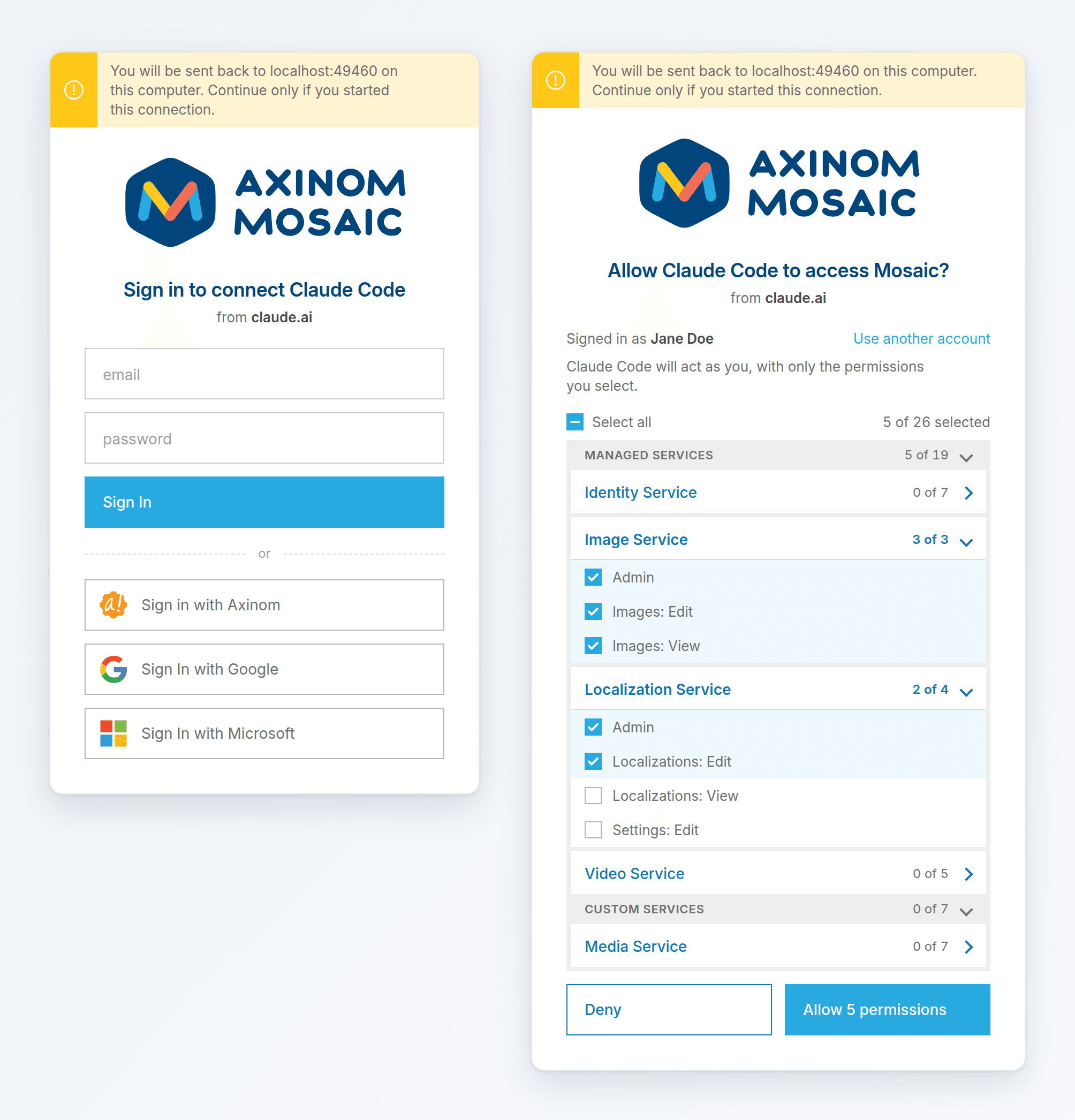
- Sign-in page: the same identity providers as the sign-in of the Management System, with their configured names and images. A user who is already signed in to the Management System in the same browser skips this page.
- Permission page: which application asks for access, and the permissions that the user has, grouped by managed and custom services. The user selects the permissions to grant; Select all selects all of them. When the application returns to an address on the same computer, the page shows a warning, so the user can check that they started the sign-in. On a later sign-in of the same application, the previous selection is preselected.
- Deny returns to the application without access.
A user never sees or grants permissions they don't have. Each sign-in creates a separate session with its own granted permissions. To use different permissions for different tasks, connect the same application more than once.
Access Tokens
Access tokens of OAuth sessions have the same format as Management System tokens and work with every Mosaic service. These claims differ:
| Claim | Management System | OAuth session |
|---|---|---|
aud | * | The requested resource, e.g. the MCP server URL of the environment |
name | Jane Doe | Jane Doe (via Claude Code) |
permissions | The permissions of the user's roles | The granted permissions that the user still has |
exp | The environment's access token lifetime | The environment's access token lifetime, at most 10 minutes |
The refresh token is an opaque value that only the token endpoint accepts.
Sessions
The application refreshes its access token with its refresh token before or when it expires.
- Rotation: every refresh returns a new refresh token and invalidates the previous one.
- Replay protection: if a previous refresh token is used again, the session is revoked. A stolen refresh token then stops working for everyone.
- Lifetime: each refresh extends the session by the environment's cookie lifetime, up to 90 days after the sign-in, as long as the sign-in at the identity provider lasts. After that, the user signs in again.
- Permission changes: a permission removed from the user's roles disappears from the next access token. A permission the user gains is only added after the user grants it in a new sign-in.
| Action | Effect |
|---|---|
| Disable the OAuth client | Its sessions can no longer refresh |
| Delete the OAuth client | Its sessions are deleted |
Delete a session (deleteUserSession) | The application fails at its next refresh |
Revoke all sessions of a user (revokeRefreshToken) | All applications of the user fail at their next refresh |
| Remove a permission from a user role | Gone from the next access token |
These take effect at the next refresh. Access tokens already issued stay valid until they expire, within 10 minutes. When a refresh fails, the application asks the user to connect again.
The access management API of the Identity Service lists the active sessions of an environment with userSessions (permission USER_SESSIONS_VIEW): user, identity provider, OAuth client, resource, granted permissions, creation, last use and expiry.
Service Accounts
Service accounts get access tokens from the token endpoint with the standard OAuth 2.0 client credentials grant. Any OAuth library or tool works without Mosaic-specific code:
curl -X POST https://id.service.eu.axinom.net/<tenant-id>/<environment-id>/oauth/token \
  -u "<client-id>:<client-secret>" \
  -d grant_type=client_credentials
The client ID and secret can also be sent in the request body (client_secret_post).
The access token is the same as from the authenticateServiceAccount mutation, which keeps working.
See Authenticate a Service Account.
Supported Standards
| Standard | Support |
|---|---|
| OAuth 2.1 | Authorization code flow with PKCE, exact redirect URI matching, refresh token rotation; no implicit or password grant |
| RFC 6749, OAuth 2.0 | Client credentials grant for service accounts. Scopes are not used: users grant permissions on the permission page |
| RFC 7636, PKCE | Required, S256 only |
| RFC 8414, Authorization Server Metadata | Per environment |
| RFC 8707, Resource Indicators | One resource per token, which becomes the aud claim |
| RFC 9207, Issuer Identification | iss in every authorization response |
| RFC 8252, OAuth for Native Apps | Loopback redirects on any port and private-use URI schemes |
| RFC 9700, OAuth Security Best Current Practice | PKCE, exact redirects, refresh token rotation with replay protection, CSRF protection, no framing of the pages |
| OAuth Client ID Metadata Document | Supported |
| RFC 7591, Dynamic Client Registration | Not supported, in favor of Client ID Metadata Documents, as recommended by the MCP specification |
| OpenID Connect (as a provider) | Not supported: no ID tokens or userinfo for clients |